How I Turned a Single-File Outreach Tool Into a Team CRM
How a single-file outreach MVP evolved into a multi-user CRM with Supabase row-level security, Cloudflare Workers email flows, and a shared team playbook.
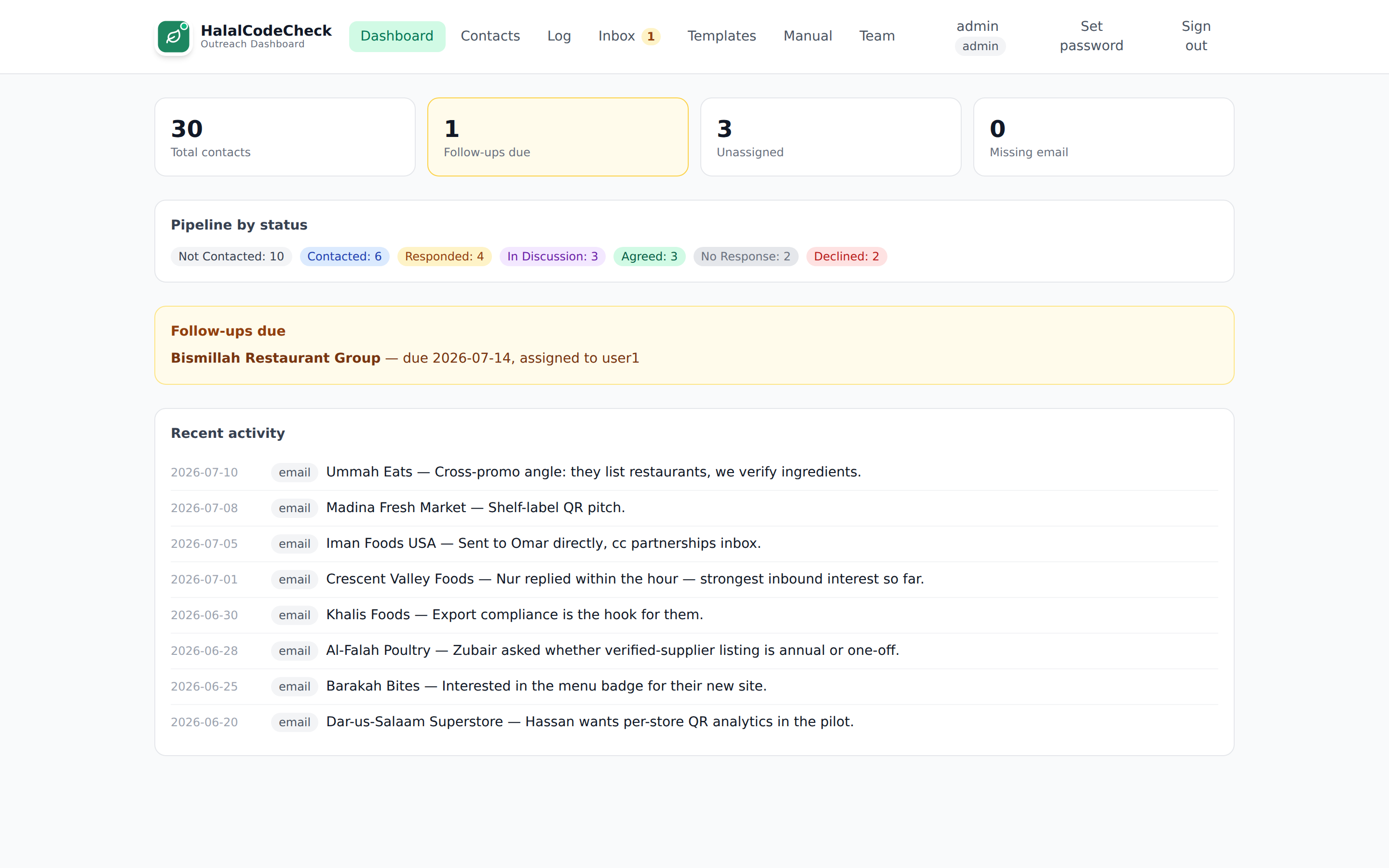
The first version of our outreach CRM was the single-file Outreach Planner: one HTML file with everything stored in localStorage.
At that stage, the real work was not building software. It was defining the Ideal Partner Profile, shaping the outreach workflow, and figuring out whether a structured process would actually help us start better conversations.
I chose the fastest possible version: a simple HTML tool that was up and running in a few hours.
For the MVP stage, that was enough. It gave me a place to test the pipeline stages, templates, follow-up cadence, and outreach assumptions without building infrastructure first. Once the workflow was validated, the next iteration needed a stronger foundation: shared visibility, assigned ownership, email history, role-based permissions, and a playbook where the work actually happened.
That was not the end of the system’s evolution. When the operation later became a two-sided, managed referral service, the contact stopped being the right unit of work. The next version had to model each possible customer-provider route, its outcome, and the fee attached to it.
This post is the practical version of that story: what the MVP proved, what the next iteration needed, and how much AI-assisted development changed the cost of building it properly instead of duct-taping the original file.
What the MVP proved
HalalCodeCheck helps halal-conscious consumers research ingredients, certifications, and brands before they buy. At a certain point, growth stops being purely product-led and starts becoming relationship-led. You need to talk to brands, retailers, marketplaces, and certification bodies, and you need follow-ups, context, templates, and a shared memory of every conversation.
The single-file tracker validated that this process was worth investing in. It proved the shape of the workflow: how prospects moved through the pipeline, which templates were useful, what follow-up cadence made sense, and what information needed to be captured.
What it did not prove was the architecture. That was never the point. A single HTML file was supposed to answer a simpler question first: is this workflow worth a real build at all? Once the answer was yes, the next step was not to keep stretching the MVP. It was to rebuild the system around the parts the first version had intentionally avoided.
What I needed was not “a CRM” in the abstract. I needed a very specific operating system for partnership outreach, informed directly by watching the MVP in use:
- A shared pipeline where the whole team can see the work. Not just the one browser it lived in.
- Assigned ownership so one person is responsible for each relationship. A named owner on every contact, so nothing fell through because “someone” was handling it.
- Email templates with consistent messaging. One shared library, so outreach didn’t depend on whoever was writing that day.
- A log of every touch across email, LinkedIn, calls, and notes. Logged in one place instead of someone’s memory.
- Inbound website inquiries captured inside the same system. Landing in the pipeline instead of a personal inbox.
- The team’s playbook available in context while doing the work. Right where the work happens, not a tab away.
I looked at HubSpot, Pipedrive, Airtable, and Notion first. For a more generic pipeline, any of them would have been fine. But the specific combination I needed, real per-record permissions, email logging on our own domain, and the playbook embedded in the workflow, kept turning into workarounds rather than fits. That wasn’t a knock on those tools. It just meant the requirements had become specific enough to justify a custom system.
If you’re weighing the same jump for your own prototype, Replit to Production: What to Fix in Your App Before Real Users Hit It covers the technical checklist for that transition.
Where AI helped
I built this with Claude Code doing most of the typing.
That’s an important distinction. It didn’t do the deciding. I still had to define the workflow, review the migrations, think through edge cases, and choose where enforcement belonged. But a project that used to feel like “several weekends plus a lot of avoidance around the email part” became “a handful of evenings with momentum.”
The most useful pattern was treating AI as a fast implementation partner, not an authority.
I’d describe a rule in plain English:
- Members should not be able to edit contacts assigned to someone else
- Archived contacts should remain visible but become read-only
- Contact form inquiries should land in an inbox where they can be attached to an existing contact or turned into a new one
And from there, the tool could usually produce the migration, policy change, Worker update, and UI wiring in one pass. My job was to verify the logic, tighten the edges, and make sure the implementation matched the rules I actually wanted.
If that idea resonates, Disposable Software: How I Built a Custom Hiring Dashboard with AI in an Hour explores the same shift from another angle.
What the outreach CRM actually does
The easiest way to explain the tool is through the workflow it supports.
A team member finds a prospect and adds them with the fields we actually care about: organization, contact person, email, region, category, pitch angle, fit, and assigned owner. From there, the record moves through a simple status pipeline: not contacted, contacted, responded, in discussion, agreed, or declined.
The assignee can send an email from inside the contact view using a shared template. Placeholders are filled from the real record, the message goes out from our own domain, and the send is logged automatically. Follow-ups stay attached to the same thread.
LinkedIn is intentionally manual. We log the touch, but we don’t automate the platform. That’s both a compliance decision and a sanity decision.
When replies come back, they route into the system and attach to the right conversation. When someone submits the website contact form, that inquiry lands in an admin inbox where it can be triaged into the pipeline instead of disappearing into someone’s personal mailbox.
The outreach playbook is the manual behind the workflow: how we research prospects, qualify fit, choose an angle, use templates, handle common objections, and move a conversation forward. It lives inside the same app, with worked examples and admin-only pages for pricing or negotiation context, so the manual also doubles as the onboarding guide for new team members.
That’s the real value of internal software when it’s done well. It’s not just storage. It’s workflow plus context.
The walkthrough below shows the dashboard, contact workflow, inbox triage, templates, and manual in motion:
The architecture, briefly
I kept the stack deliberately boring.
- React + Vite for the frontend
- Supabase for Postgres, auth, and row-level security
- Cloudflare Workers for small single-purpose backend jobs
- Cloudflare Email Routing and Email Sending for the mail pipeline
Here is the request flow before I break down the main pieces:
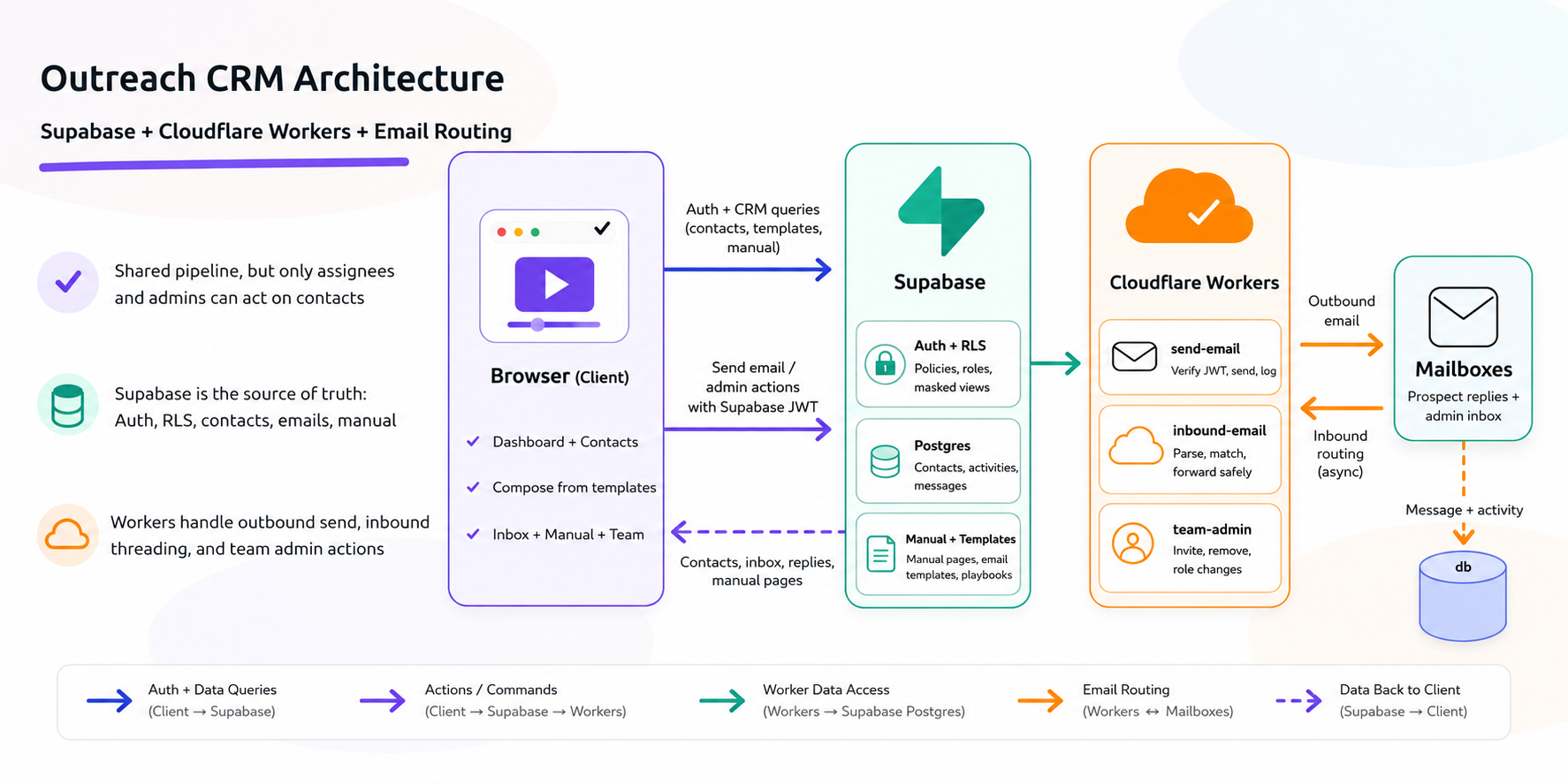
Database and permissions
The frontend is a standard React SPA, but the important rules live below it. Supabase Postgres is the source of truth for contacts, activities, templates, email messages, and the manual, with row-level security enforcing what each user can do:
- Team members can read the pipeline
- Only the assignee or an admin can update a contact
- Only admins can delete contacts
If the UI renders the wrong button, the database still refuses the wrong action.
Team management uses the same model. Inviting a teammate is a magic-link email and a role picker, admin or member. Removing someone unassigns their contacts instead of leaving orphaned records around.
Workers and email
The backend is a few narrow Cloudflare Workers, each with one responsibility:
- One sends outbound mail and logs it
- One handles inbound mail, threading, and triage
- One handles admin actions like invites and team management
The send-email Worker verifies the user’s Supabase JWT, checks whether they can act on the contact, sends through the configured mailbox, and writes both an activity row and a stored message record. The inbound Worker parses raw email, matches by thread headers first and sender second, detects auto-replies, and lands unmatched messages in the admin inbox for triage. The admin Worker is the only place where user-management actions need elevated privileges.
Sending email is easy. Sending it with the right sender controls, threading headers, activity logging, and role checks is more work. Receiving replies and attaching them back to the right contact is where the real mess begins.
The email scope stayed manageable because the rules were explicit:
- Outbound only happens through a Worker, never from the browser
- The Worker re-checks authorization before sending
- Inbound mail is matched by thread first, sender second
- Auto-replies are stored without cluttering the activity feed
The tricky part was preserving conversation context. Outbound replies need correct In-Reply-To and References headers, and inbound matching works better by thread first, sender address second.
Reliability
Every inbound message gets forwarded to a fallback mailbox before anything clever happens. My rule from day one was simple: never lose mail to a bug.
This is not “microservices” in the overengineered sense. It’s a database with strict policies and a few small isolated jobs with clear boundaries. If I had to summarize the email lesson, it would be this: optimistic software is fine, but pessimistic email handling is better.
What I’d tell another founder building the next version of their own tool
The prototype-to-production jump used to be expensive enough that a lot of good internal tools never made it across. That’s changed, but a few things still matter regardless of how fast AI can type.
Let the MVP tell you what the real version needs. I didn’t guess at the requirements for this CRM. Six months of using a single HTML file told me exactly which gaps actually hurt and which ones I was imagining.
Build when you can review what ships. AI can compress implementation time. It does not remove the need for judgment. If nobody on the team can inspect the auth logic, data model, or failure cases, that’s a reason to slow down, not a reason to avoid building.
Treat email as the sharpest edge. Threading, inbound parsing, auto-replies, weird sender behavior, form relays, archived contacts. Budget more attention for email than you think you’ll need.
Keep the privileged logic narrow. The useful unit here wasn’t one large backend. It was Postgres with strict policies plus a few narrow Workers for the places where authorization checks, email handling, or user-management actions had to happen server-side.
If you’re using AI to ship internal tools, 5 Signs Your Lovable/Bolt App Isn’t Ready for Real Users covers the other side of the equation: what still needs human review before you trust the result.
The bigger takeaway
This was not about choosing custom software over packaged software by default. It was about noticing when a small internal MVP had done its job and it was time to rebuild the workflow on foundations that matched how the team actually worked. AI tooling changed the timing of that decision: what used to feel like a quarter-long internal tools project became something I could build and review in a handful of focused evenings.
The outreach CRM now runs the partnership motion for the team. The next teammate gets an invite, the playbook sits where the work happens, and the system reflects reality because emails and activities log themselves instead of relying on someone to remember admin work later.
Built a quick internal tool that is starting to carry real work? If you want a second opinion on what the team-ready version should look like, let’s talk.
Kashif Aziz · AI Codebase Audit
Need help fixing or hardening this kind of code?
I refactor messy or AI-generated code into maintainable, production-ready systems.