How I Audited 600 Blog Posts After a WordPress to Astro Migration
After a WordPress to Astro migration, I audited 600 blog posts to find thin content, decide what to noindex, merge, or expand, and improve overall site quality.
I worked on a WordPress to Astro migration project for an expat content blog that had been running since 2008. Over 600 posts, built up over years on WordPress. The goal was clear: move to Astro for a faster site, less plugin bloat, and full control over the stack.
The migration itself was straightforward. The content quality, less so.
After importing everything, a quick word count check revealed something uncomfortable: over 50% of the site was under 250 words. Old news snippets. Brief announcements. Posts that were useful in 2013 and are dead weight today.
Before touching anything, I needed a way to see everything at once. So I built a dev-only review page.
Quick Answer
The review page gave me one place to:
- spot thin posts fast
- suppress ads on low-value pages automatically
- decide which URLs to noindex, merge, or expand
- audit a 600-post migration without touching a CMS
If you’re moving a large blog from WordPress to Astro, that kind of visibility matters more than the migration script itself.
The Problem With Migrating Old Content
Google’s Helpful Content system evaluates your entire site, not just individual pages. A large proportion of thin, low-value content can dilute your overall quality signals, which makes it harder for your strongest pages to carry the site.
Here’s the distribution I found after the migration:
| Word count | Posts |
|---|---|
| 0–50 words | 12 |
| 51–100 words | 57 |
| 101–150 words | 90 |
| 151–250 words | 168 |
| 251–500 words | 178 |
| 500+ words | 116 |
69 posts under 100 words. Most were old news items that ranked for nothing and added zero value. Just dead weight dragging down everything else.
What the /review Page Does
It lives at /review/ and only runs in dev mode - it redirects to a 404 in production. No accidental indexing.
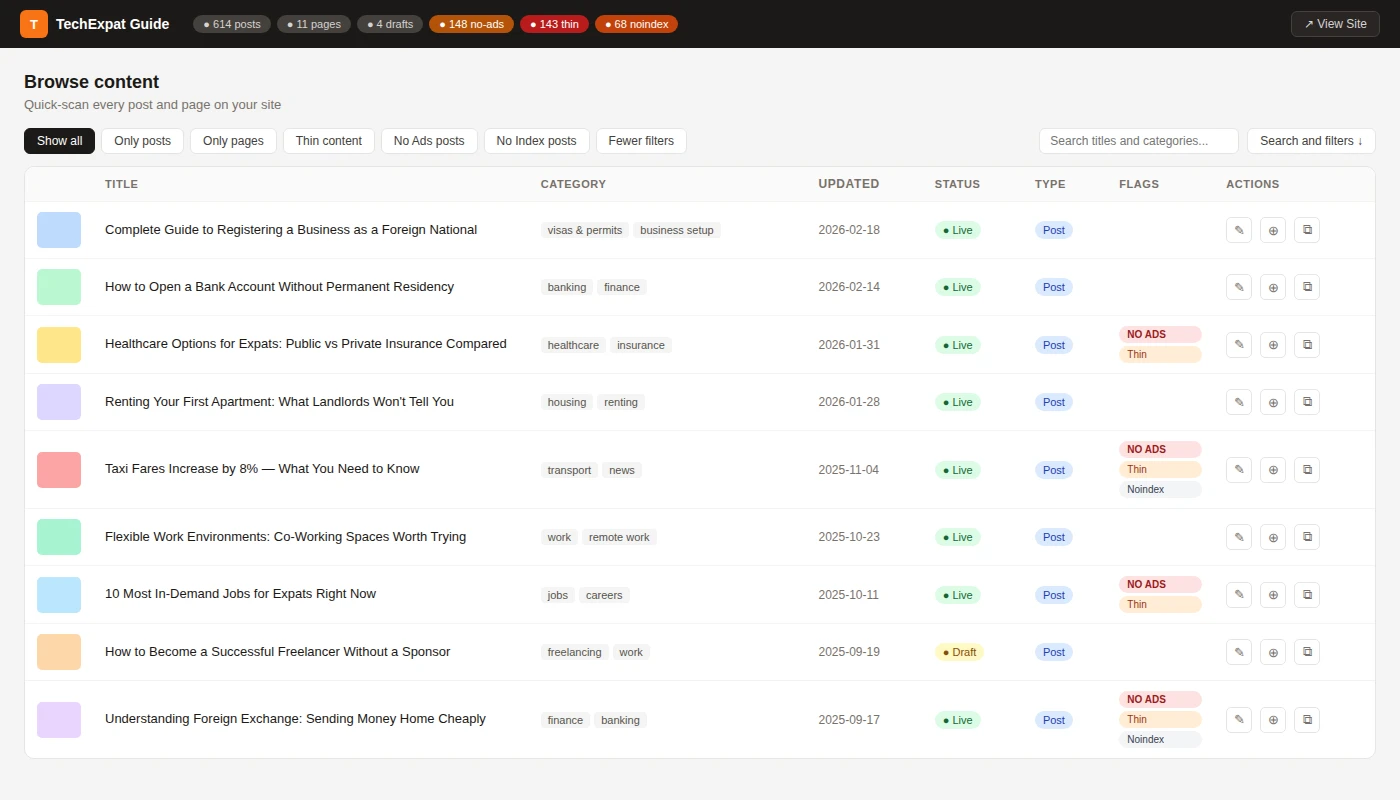
The page pulls every post and page from Astro’s content collections and shows them in a searchable, filterable grid:
At a glance, the page shows:
- Word count per post
- Thin content flag - automatically set for posts under 150 words
- No-Ads flag - manually set via frontmatter, or automatically applied to thin posts
- Noindex flag - for posts explicitly excluded from search
- Stat pills in the header: total posts, no-ads count, thin count, noindex count
- Filter by flag - one click to see all thin posts, all noindex posts, all ad-suppressed posts
- Copy path button - copies the file path to clipboard so you can jump straight to the file in your editor
The whole thing is self-contained: no Tailwind, no component imports, no dependencies on the site’s design system. It runs off Astro’s built-in getCollection() and a vanilla CSS/JS page.
The Three-Tier Content Strategy
With the full picture visible, we split the content into three tiers:
Tier 1 - Noindex posts under 100 words. Too short to fix, too weak to keep indexed. A noindex: true frontmatter flag plus a meta robots tag removes them from Google’s quality assessment without deleting anything. Fully reversible.
Tier 2 - Merge related thin posts. There were multiple news articles covering the same recurring topic from different years. These merge naturally into one evergreen guide with 301 redirects from the old URLs.
Tier 3 - Expand posts on genuinely good topics that just never got proper treatment. A 120-word post on a high-intent topic deserves to be a real 600-word guide - it just needs the work.
What Changed After the Audit
Once everything was visible in one place, the cleanup plan got much simpler:
- the shortest posts became obvious noindex candidates
- overlapping news posts became merge candidates with clear redirect targets
- thin but promising topics stood out as expansion opportunities
- ad suppression stopped being a manual judgment call on every post
The review page didn’t just surface bad content. It turned a vague “this site feels messy” problem into a concrete action list.
The AdSense Connection
Here’s something that often gets missed: Google’s AdSense policies flag thin content as low-quality ad inventory. Showing ads on a 60-word post is a policy risk - and pointless, since nobody clicks ads on pages they bounce from immediately.
So I tied the thin content flag directly to ad suppression in the post layout:
const wordCount = (post.body ?? '')
  .replace(/<[^>]+>/g, ' ')
  .split(/\s+/)
  .filter(Boolean).length;

const adsEnabled = !noAds && wordCount >= 150;
Every post under 150 words automatically has ads suppressed - no manual work needed on new posts. The noAds: true frontmatter flag handles manual overrides (like sponsored content where you don’t want AdSense competing with the paid placement).
The review page makes this visible. At a glance you can see exactly which posts are showing ads and which aren’t, and why.
The Key Code
1. The ad-suppression rule:
const wordCount = (post.body ?? '')
  .replace(/<[^>]+>/g, ' ')
  .split(/\s+/)
  .filter(Boolean).length;

const adsEnabled = !noAds && wordCount >= 150;
This is the part that turned the content audit into an actual site rule instead of a spreadsheet note.
2. The content mapping logic:
const posts = allPosts.map((p) => {
  const wordCount = (p.body ?? '')
    .replace(/<[^>]+>/g, ' ')
    .split(/\s+/)
    .filter(Boolean).length;

  const manualNoAds = p.data.noAds === true;

  return {
    title: p.data.title,
    wordCount,
    noAds: manualNoAds || wordCount < 150,
    noindex: p.data.noindex === true,
  };
});
This is the core of the page: take each post, compute the useful audit signals, and then let the UI filter and sort around those fields.
The rest - the grid, filters, pagination, and search - is vanilla JS operating on a serialised array passed via define:vars. The full implementation is around 300 lines of Astro frontmatter plus self-contained CSS and JS.
Why Not Just Use a CMS Dashboard?
Netlify CMS, Decap, Keystatic - they all have content listings. But they don’t know about your specific quality signals. They don’t tell you which posts have ads suppressed and why. They don’t give you a copy-path button wired to your editor setup.
A custom dev page takes an afternoon and gives you exactly what you need. And because it builds with the site - reading from the same content collections as everything else - there’s no separate service to maintain, no API tokens, no sync issues.
Making It Reusable
The review page is tightly coupled to the project’s schema - field names, collection structure, hero image logic. Copying it to another Astro project means adapting around 50 lines of frontmatter code.
I packaged it as a Claude Code skill stored at ~/.claude/skills/review-page/. When I type /review-page in a new Astro project, Claude reads the project’s content.config.ts, discovers the collection names and field mappings, adapts the data layer, and copies the rest verbatim.
If you’re running a content site on Astro and haven’t done a content audit yet, the distribution you find will probably surprise you.
And if you’re migrating a large content site to Astro and need help deciding what to keep, merge, noindex, or improve, that’s exactly the kind of audit work I can help with.
Tags:
Want help applying this to your product?
If this post matches what you are building, I can help you execute it with clear scope and delivery.