Building a Video Upload Pipeline with Cloudflare Stream and Supabase
How I built a resumable video upload pipeline for mobile apps using Cloudflare Stream and Supabase — with a full cost breakdown, webhook gotchas, and what to upgrade next.
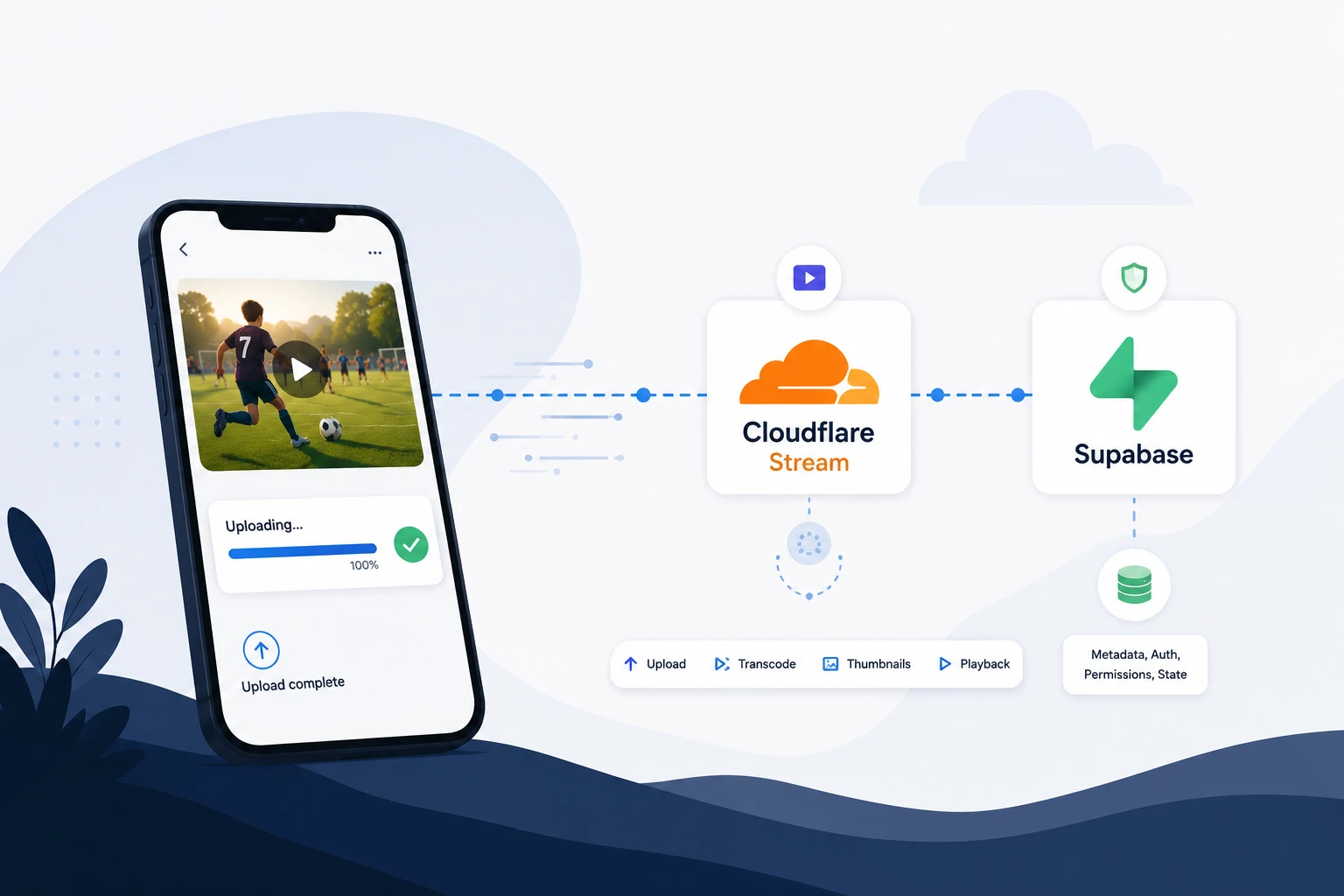
A parent records a 20-second highlight on an iPhone at the sideline. By the time they walk to their car, it should already be in the app, transcoded, and playable. That’s the product promise.
Delivering it forced one question: do I want to own video infrastructure at all? For a standalone MVP uploader for mobile sideline highlights, the answer was no — I needed reliable uploads and fast shipping, not a custom transcode stack.
Cloudflare Stream and Supabase split the work cleanly. Stream handles upload, transcoding, thumbnails, and playback. Supabase handles metadata, auth, Edge Functions, and database rules. The browser never sends video bytes through my backend — only metadata and orchestration touch Supabase.
TL;DR
- The browser saves clip metadata to Supabase and uploads the file directly to Cloudflare Stream over TUS
- Supabase never receives the video bytes — it orchestrates permission, state, and webhooks
- When Stream finishes transcoding, it POSTs a signed webhook to Supabase; only then is the clip playable
- No FFmpeg, no media server, no polling worker
Stack: React · TUS · Cloudflare Stream · Supabase Edge Functions · Postgres · Supabase Auth · Stream iframe playback
Architecture
Two services, one pipeline. Cloudflare Stream owns everything video-specific; Supabase owns product rules — who can upload, what status a clip is in, who can see it once published.
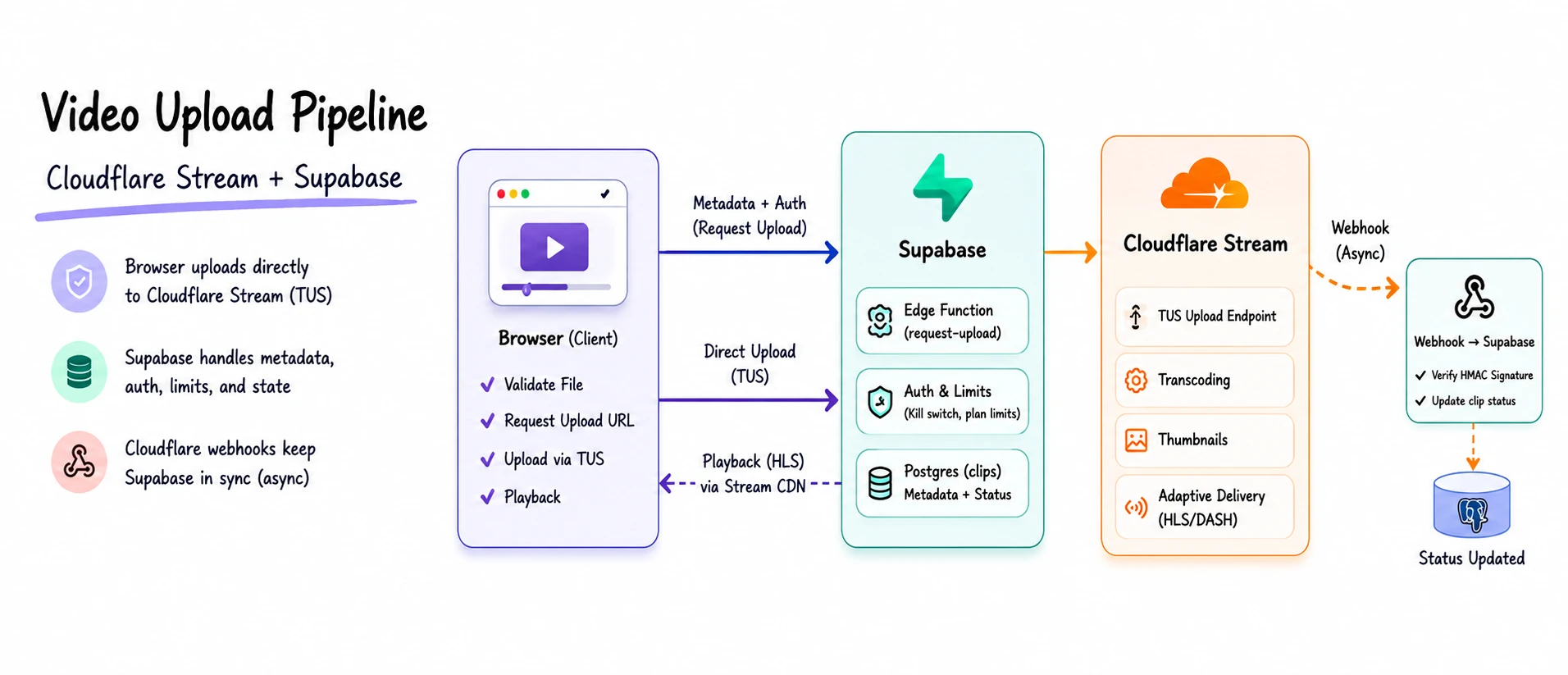
Three lanes: browser to Supabase for metadata, browser to Stream for the file via TUS, Stream back to Supabase via webhook when processing finishes.
The sections below cover the upload flow, webhook handling, why Stream over alternatives, what Supabase owns, cost, and what to change when you outgrow the prototype.
Lifecycle and state
Every clip follows a strict status path:
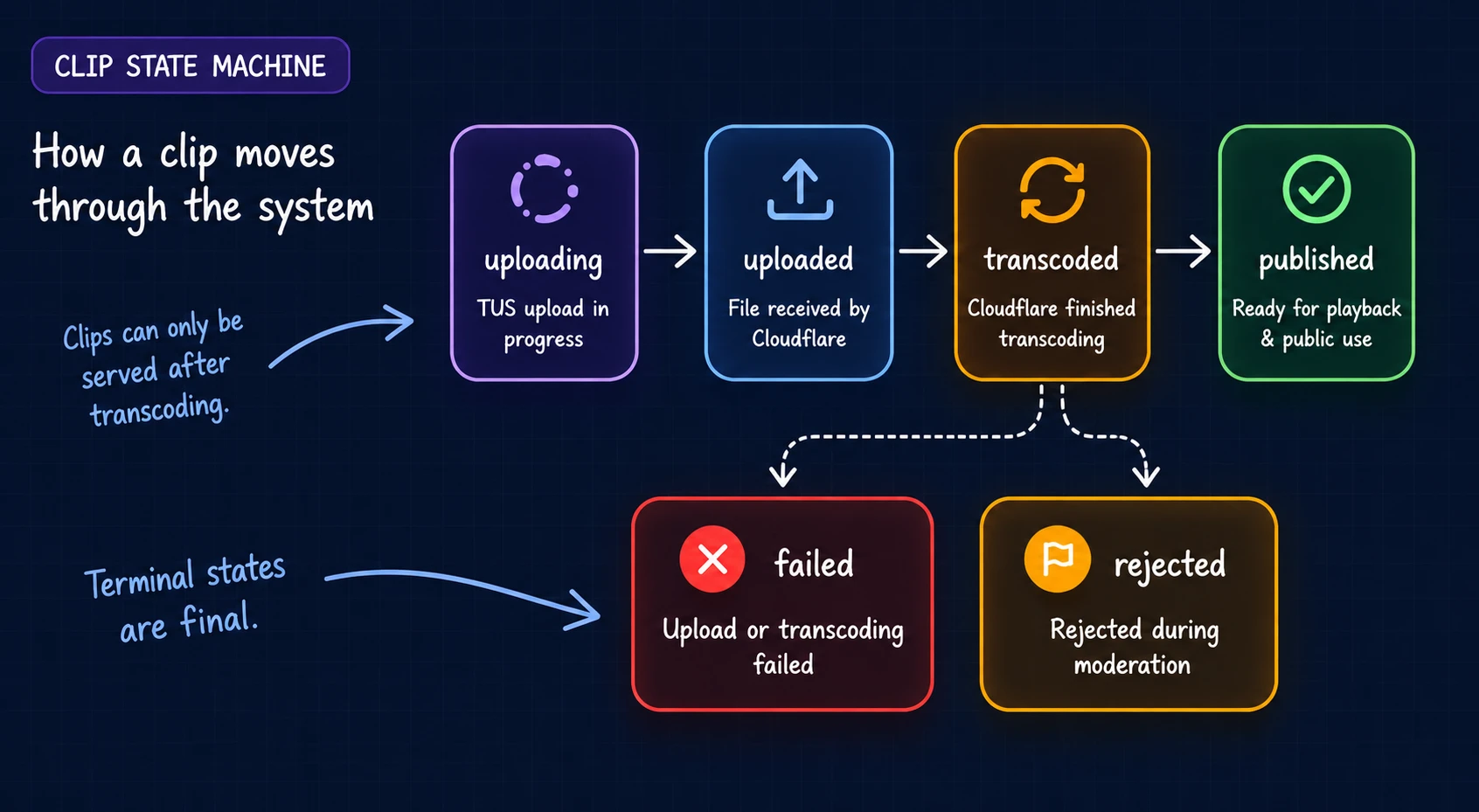
Statuses move in order: uploading → uploaded → transcoded → published, with failed and rejected as terminal states. Clips can’t skip steps — a row can’t go public until upload and transcoding are both confirmed. Without that, you get database records that aren’t watchable yet, which breaks moderation and UI state.
In the prototype, parents see simple upload progress; coaches only see clips at published.
Upload
The upload path has two jobs: validate before wasting bandwidth, and keep the backend out of the file transfer.
Step 1 — validate in the browser. Check file size, that the file is readable as video, and duration. For this workflow: 5–30 seconds, 200 MB cap. Invalid files fail before the user waits through an upload.
Step 2 — ask Supabase for a TUS URL. The client calls a Supabase Edge Function, which checks a kill switch, enforces a monthly upload cap, requests a TUS URL from Stream, inserts a clips row at uploading, and returns the URL. Supabase controls whether an upload is allowed; it never receives the file.
Step 3 — upload to Stream with TUS. The client uses tus-js-client (or Cloudflare’s first-party direct-upload SDKs). Uploads are chunked with retry and backoff — essential for sideline Wi-Fi. If TUS fails after retries, the row stays at uploading; no webhook fires for a clip that never reached Stream.
Webhooks
Transcoding is asynchronous. Upload success is not playback readiness.
When Stream finishes processing, it POSTs to a Supabase Edge Function. That handler verifies the Webhook-Signature (HMAC-SHA256) before touching Postgres — without verification, anyone who knows the URL can spoof status updates. You can scope events with Webhook Subscriptions instead of relying on a single account-wide hook.
readyToStream is the field that matters. Processing can complete before the clip is actually playable. Only promote a row from uploaded to transcoded when readyToStream is true. Reject unknown video IDs (Stream sends account-wide events), and treat duplicate deliveries as idempotent.
Webhooks beat polling: no “is it ready yet?” loop, no background worker, one row update per event.
Gotchas worth designing for upfront:
- Client vs webhook race. If the frontend writes
uploadedwhen TUS finishes while the webhook fires at the same moment, you get conflicts. Let webhooks own database lifecycle states; use the client only for local loaders and optimistic UI. - Timing-safe verification. In Deno, don’t compare signatures with
===. Usecrypto.subtle.verifyfor constant-time HMAC checks. - Duplicate deliveries. If the target status is already set, exit cleanly.
Playback and deletion
Once transcoding works, playback is thin: thumbnails and a Stream iframe embed. No custom player, format detection, or bitrate logic. The prototype uses public playback — a deliberate shortcut.
Deletion must hit both systems: remove the Postgres row and call Stream’s delete API. Otherwise you get orphaned assets (ongoing storage cost) or stale RLS-visible references. Soft-delete first if you want a recovery window.
Why Stream
I looked at Mux, Cloudinary, and AWS before landing here.
Mux was the closest call — strong DX, solid direct uploads. I wanted predictable per-minute billing I could cap with upload limits at prototype scale; Stream fit that mental model. Mux’s playback analytics and API depth weren’t needed for ingest-and-play.
Cloudinary targets asset-heavy workflows — transforms, crops, DAM. This uploader only needed ingest, transcode, play.
AWS would mean MediaConvert, S3, CloudFront, and job orchestration at minimum — back to owning video infrastructure.
Stream vs R2 was the harder call within Cloudflare:
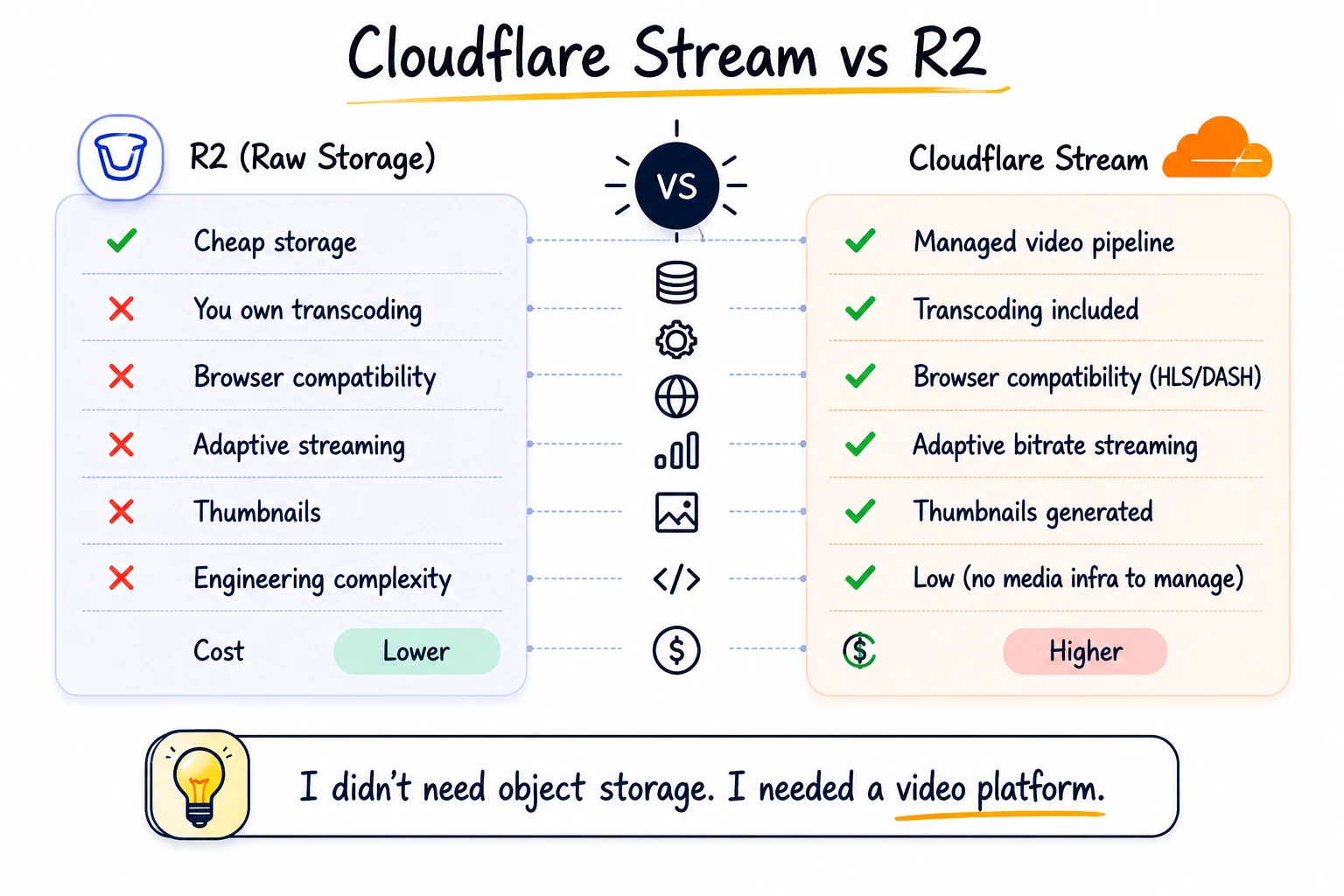
R2 is cheap storage with no egress fees. The problem was never storage — it was playback. iPhones upload HEVC; other devices send H.264 or different containers. Serve raw files from R2 and you own compatibility, transcoding, and every “works on my phone, not theirs” ticket.
I’d seen HEVC from iPhones fail silently on mobile Safari before — no error, just a broken player. Stream removes that: upload whatever the device produced; get web-friendly formats, adaptive streaming, thumbnails. Treat it as a media delivery problem, not a file storage problem.
What Supabase owns
Supabase is the control layer, not the video platform:
- Edge Functions — upload handshake, webhook handler, coordinated deletion
- Postgres — clip metadata and workflow state
- Auth — tie submitters to their clips
- RLS — parents read their own clips in any status; coaches only see
publishedclips in the review feed
Kill switch, monthly upload cap, and webhook processing all live here. Stream never needs to know your product rules; Supabase never needs the video bytes.
What it costs
Assumptions: 50 uploads/day, 30-second clips, ~10 views per clip.
| Billable Vector | Cloudflare Stream Pricing Structure | MVP Cost Estimate (At Prototype Scale) |
|---|---|---|
| Video Storage | $5.00 per 1,000 minutes stored / month | $3.75 / mo (~750 total minutes accumulated) |
| Video Delivery | $1.00 per 1,000 minutes delivered | $7.50 / mo (~7,500 playback minutes used) |
| Supabase Compute | Free Tier (Up to 500k Edge invocations) | $0.00 (Well within standard operational limits) |
| Total Pipeline Cost | — | ~$11.25 / month |
Directional estimates only — delivery billing includes buffering and segment preloading. Supabase stays on the free tier at this scale; Pro ($25/mo) dominates only when you outgrow limits.
Where costs spike: delivery. Storage is predictable; a viral clip burns delivery minutes fast. The kill switch, monthly cap, and prepaid storage limit are cheap guardrails while usage is still unknown.
Beyond the prototype
Good fit if you:
- are building an MVP with direct mobile uploads
- care more about playback reliability than storage cost
- don’t want to own transcoding yet
- have a small team moving fast
Poor fit if you:
- operate at massive scale with an existing media pipeline
- need deep custom playback control
- are optimizing storage and delivery to the cent
First upgrades when you outgrow prototype:
- Signed playback URLs or tokens — pair with
allowedOrigins; closes the public-by-video-ID gap - Role-based moderation RLS — explicit admin/moderator rules instead of broad authenticated access
- Cache headers on thumbnails and browse pages — replace prototype workarounds
- Edge Function region placement — test upload-init latency closer to users vs the database
Building a video upload feature for your MVP? If you want a second opinion on your stack before you build it, let’s talk.
Want help applying this to your product?
If this post matches what you are building, I can help you execute it with clear scope and delivery.